Whether you have an active business social media account or are a casual scroller, you are sure to have stumbled upon either a Facebook or Instagram ad (known in the biz as a Meta Ad) or a boosted post. These both fall within the “paid social” world and are sometimes used interchangeably, but have some specific differences that are important to consider when planning your paid social media marketing strategy.

The short answer for deciding between a boost or an ad: boost for quick, scalable visibility on a post that’s already performing well; use Ads Manager for specific goals, precise targeting, or longer campaigns.

As with anything in the Meta ecosystem, there is more than meets the eye. There are important considerations for each route, so let’s walk through each advertising option to help you understand their similarities and differences. This should help you decide which is right for your business.

Jump to glossary 

What is a Meta Ad?

A Meta Ad is content you pay Meta to distribute to a specific audience across Meta’s ecosystem, including Facebook, Instagram, Threads, Messenger, WhatsApp, and Audience Network. In some ways, Meta Ads are the opposite of Boosted Posts: with a Meta Ad, you start with a budget & objective, whereas a boosted post usually starts with content.

Where are Meta Ads Managed?

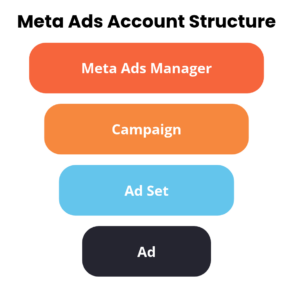
Meta Ads are created and managed primarily through Meta Ads Manager and must comply with Meta’s advertising rules. They are structured as a Campaign with a specific objective and then consist of an Ad Set(s) and Ad(s).

A funnel diagram titled Meta Ads Account Structure illustrating the hierarchy from top to bottom: Meta Ads Manager, Campaign, Ad Set, and Ad, useful for marketers wondering if hashtags are still relevant to their strategy.

Where are Meta Ads managed?

The campaign objective you choose when building a Meta Ads campaign determines what your ads are optimized to achieve. Meta offers these objectives to choose from when creating a campaign:

  • Awareness: increasing brand awareness by getting your ad in front of as many accounts as possible
  • Traffic: driving traffic to your website or social media profiles
  • Engagement: increasing engagement metrics like video views, messages, or post engagements on a specific ad
  • Leads: increasing the number of leads for your business or brand
  • Sales: increasing purchases of your products or services
  • App Promotion: increase the number of app installs

Review all objective options and choose wisely. Once your campaign is launched, you can’t change the objective.

Who should use Meta Ads?

Meta Ads is the better fit if you have a specific outcome in mind, like leads, website traffic, or app installs, or if you simply want more control over who sees your ad. It’s also the right choice for ongoing campaigns, because you can test different combinations of headlines, images, and audiences to see what performs best.

If you’re willing to invest time in setup and tracking, Ads Manager gives you the most room to optimize and can yield better long-term results.

Check out how Meta Ads supported a local K-8 Independent school in achieving their marketing goals.

What is a Boosted Post?

A boosted post is a Facebook or Instagram post you pay Meta to show to more people than would see it organically. It’s the simplest form of paid social: you pick a post you’ve already shared, choose a goal, audience, budget, and duration, and Meta turns it into an ad.

It appears exactly as a Meta Ad would, except it has limited placements (shows up in fewer spots on Meta platforms) and fewer placement customization options, which reduces transparency into how your boost appears across different platforms.

Where do you boost a post?

Boosted posts can be done through Ad Center or Meta Business Suite. Once the boost is live, you can also manage it through Meta Ads Manager. Still, there are fewer optimization opportunities than with a Meta Ad built directly in Meta Ads Manager. For example, you can’t run an A/B test or modify the asset or accompanying text.

What goals does boosting support?

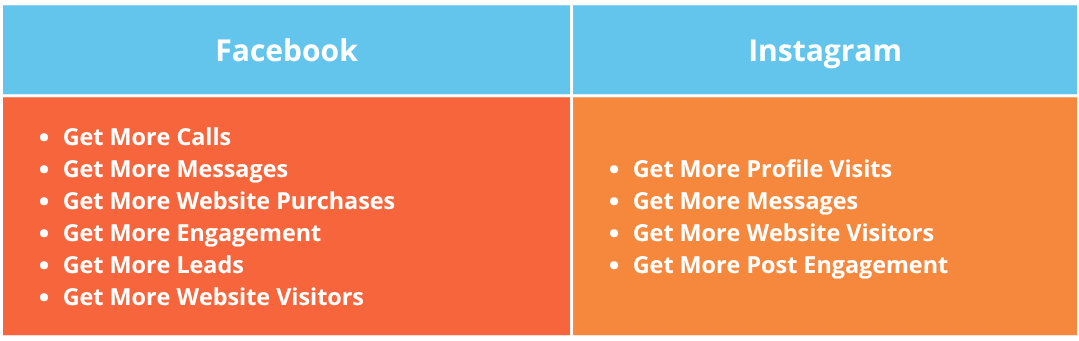
Boosting keeps things simple, so the goals are too. Depending on the post, you can typically choose to get more post engagement, profile visits, website visits, or messages. However, Facebook sometimes requires you to create an actual ad for website traffic goals with text variations.

A comparison table lists goal options for Facebook, including calls, messages, purchases, engagement, leads, and website visits; and for Instagram, where users might wonder if hashtags are still relevant while choosing profile or engagement goals.

Boosted posts on Instagram

Boosting posts works pretty much the same way on Instagram as it does on Facebook: you choose a post you’ve already shared, pick a goal, audience, budget, and duration, and Meta turns it into an ad. There are some differences in which objectives are available on the two platforms, as shown above. To boost on Instagram, you’ll generally need a professional (business or creator) account. From there, you can tap the Boost button on a post or start from Ad Center or Meta Business Suite.

Because Instagram is so visual, the post you choose matters more than anything else. A boost uses your post exactly as published, so a strong image or Reel with a clear caption will carry the spend. If you want to adjust the creative, add multiple headlines, or run a test, we recommend you move up to a full campaign in Ads Manager.

Who should use boosted posts?

If you are looking to try some DIY paid social media marketing, boosted posts are a great place to start. They require minimal familiarity with Meta Ads and can be set up quickly on a Professional Instagram Profile or Facebook Page. If you’re looking for profile growth, increased overall engagement, or quick promotion, we’d recommend spending a few dollars a day on a boosted post and testing its performance.If you are looking to try some DIY paid social media marketing, boosted posts are a great place to start. They require minimal familiarity with Meta Ads and can be set up quickly on a Professional Instagram Profile or Facebook Page. If you’re looking for profile growth, increased overall engagement, or quick promotion, we’d recommend spending a few dollars a day on a boosted post and testing its performance.

Facebook Ads Vs. Boosted Posts: Key Differences

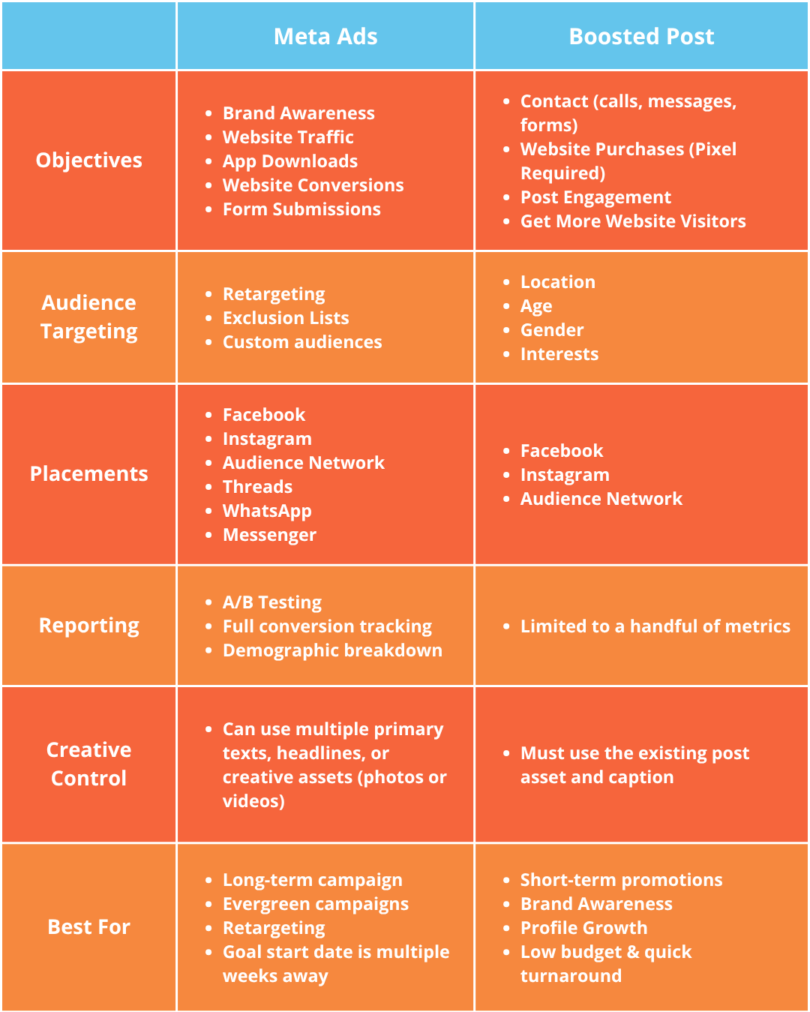
The main differences between a Meta Ad and a boosted post come down to customization options. Meta Ads offer a significantly more robust campaign and creative setup, providing users more control over who sees the ad.

That isn’t to say that Meta Ads are better than boosted posts; they just serve different purposes overall.

Comparison table detailing differences between Meta Ads and Boosted Posts across six categories, including objectives and creative control, to help you determine if hashtags are still relevant for your specific strategy.

How Much Does It Cost to Boost a Post vs. Run a Meta Ad?

Both boosted posts and Meta Ads run on an auction, and you set the budget yourself, either a daily amount or a total for the length of the run. You pay as your ad is shown, so neither route requires a large commitment to get started. Boosting posts typically requires less budget than a campaign, simply because of the duration. We often recommend boosting posts for 5-7 days for optimal results, with daily budgets as low as $5/day, depending on the results you are looking for.

For a Meta Ads campaign, budget recommendations vary mainly by the types of campaigns you are running, but other factors like audience targeting and access to ad creatives also play a role. A usual rule of thumb is that the more you’re asking of someone who is seeing your ad, the more you’ll have to spend. For example, a brand awareness campaign optimized for reach will cost less than a retargeting campaign optimized for a conversion action on a website.

In short, there is no one-size-fits-all pricing strategy for boosted posts or a Meta Ads campaign. If you want recommendations that drive results within your budget, we’re here to help.

Which Should You Choose?

Consider a few questions when deciding which route is best for you:

  1. What is my timeline? Is this a short-term campaign (e.g., promoting an event that’s next week) or a larger strategy that could run for months? Boosting is better for the short term; Meta Ads campaigns are better for long-term strategy.
  2. How long do I have to get this set up? If you’re working with a short turnaround, boosting a post is easier and can drive quality visibility in a pinch. A complete campaign can be executed quickly but requires creative development, copywriting, and additional campaign settings. Depending on who’s involved in your decision-making process, it may be better to boost an organic post that’s already been approved and published!
  3. What is my objective behind wanting to boost or run an ad? If you’re looking for on-platform awareness or engagement (e.g., profile growth, awareness), boosting could be enough. If you want website traffic or purchases, or to run a seasonal campaign for more than a few days, ads may be the better choice.
  4. What kinds of tracking or Return on Investment (ROI) data do I need access to? Boosted posts are limited to basic reporting metrics like landing page views, reach, cost-per result, and a few others, while Meta Ads offers custom conversion and event tracking. Additionally, Meta Ads provides detailed creative data, informing you on which ad copy and assets performed best to guide future strategy.

In practice, the two options work well together. A small business promoting next weekend’s event, or one that wants a few more profile visits, is usually well served by a boost. A business that wants leads or online sales, or that plans to run for weeks, will get more from a full campaign in Ads Manager. Many advertisers start by boosting a few posts to see what resonates, then use the results to inform ad creative that will be run as an upcoming Facebook or Instagram ad. 

For example, using both together might look like an evergreen (always-on) brand awareness campaign paired with a website traffic campaign that retargets people who have already interacted with the business’s ads or social media posts. The awareness campaign feeds the retargeting audience, and so do organic and boosted posts. Boosting plays a particular role here: organic posts typically reach only a portion of your existing followers, so a boost puts your best content in front of new people who fit your target audience. Every like, video view, or other interaction on a boosted post is a signal of interest, and those people can be added to the audience your traffic campaign retargets.

If you’ve made it this far, you must be seriously considering how to start or better utilize your paid social budget. We get it: investing in social media is still a relatively new area of advertising, and Meta doesn’t make it easy. If you want a hand with strategy or would rather keep your social media experience to scrolling, we’d love to chat.


Glossary

Ad Placements

All of the different ways your ad can show up. Meta offers a wide range of placements, many of which require your ad to be in specific placements to ensure it shows up correctly. For example, if you are scrolling through Reels and see a small, square ad that doesn’t fill your screen, it likely wasn’t optimized properly and tends not to perform as well.

Campaign Objective

A campaign objective is what Meta will optimize your ads for. It will impact who sees your ads, how Meta gauges performance, and the budget required for the campaign to succeed. Think of it as the North Star for your campaign.

Meta Ads Manager

A Meta platform that hosts all advertising done for a specific Meta account. Full Meta Ads campaigns are built and managed here, but boosted posts will also show up once they are live.

Meta Business Suite

A professional dashboard that allows you to link and manage a Facebook Page and Instagram Profile in the same place.

Paid Social

Paid social refers to any social media effort that is supported by paid advertising. This isn’t limited to Meta platforms; it also includes LinkedIn, TikTok, Pinterest, etc. In this blog post, we use it mainly as a differentiator from Organic Social on Meta platforms.

Organic Social

Any non-paid social media efforts. For example, publishing a post on a Facebook Page or Instagram profile without boosting it.

Want to learn more about Organic Social? Check out a few ways to level up your strategy in this blog post, or if you’d rather we handle it for you, explore our organic social media service.

Secret Link