


What Are Google’s Local Services Ads?
What if you could pay per lead instead of per click? Most people think of Google Ads when they hear “Paid Search” — and for good reason. Google commands about 90% of worldwide search volume, making it the default choice for businesses of all sizes. But there’s a lesser-known Google advertising platform that flies under the radar: Local Services Ads (LSAs).
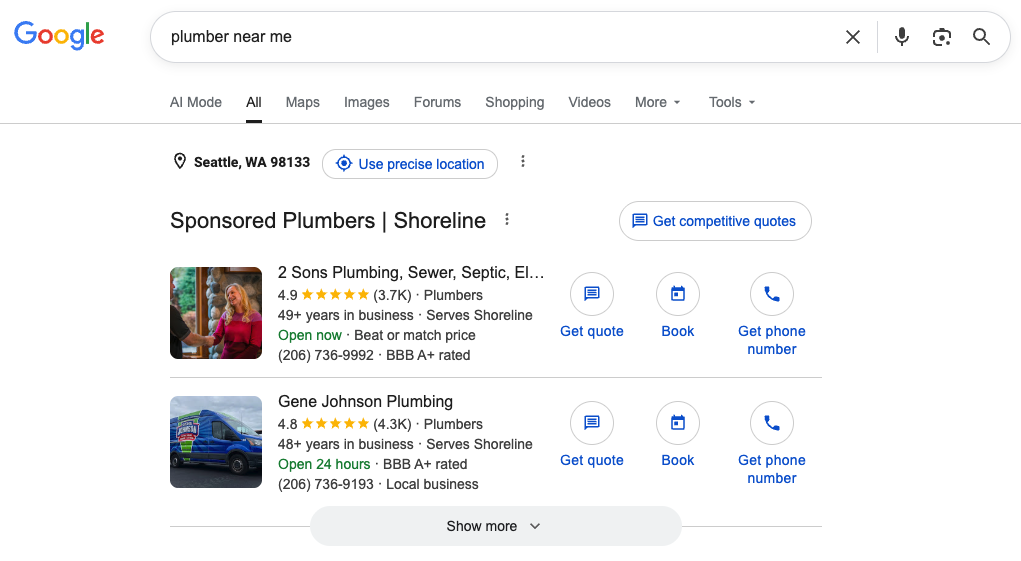
LSAs appear at the very top of search results — above traditional Google Search ads, above the map pack, above everything. And you’re only charged when someone actually calls – not just clicks.
Who’s Eligible For Local Services Ads?
LSAs have been around longer than most realize. Google launched the program back in 2015 under the name “Home Services Ads,” initially limited to test markets like San Francisco, Chicago, and New York. By 2019, the program went nationwide, though eligibility was still limited to certain service categories.
Google has steadily expanded the list of eligible industries over the years, and new ones are still added regularly. Check if your industry is eligible for LSAs in 2026.
Should I Run LSAs?
If you’re already running Google Ads, think of Local Services Ads as a complementary channel, not a replacement. If you’re new to Paid Search altogether, LSAs are actually one of the more approachable places to start. Here’s why.
Benefits of LSAs
Local Services Ads, as the name suggests, are made for service-based businesses. These ads are built for one thing: getting your phone to ring. Rather than driving traffic to your website, they put your business in front of users who are ready to take action right now. While phone calls are the primary conversion action, you can also enable email or text messaging to give users more ways to reach you.
Beyond the pay-per-lead model, LSAs occupy premium real estate on the Search Engine Results Page (SERP). They’re the very first thing a user sees. And, calls generated from LSAs tend to be high-intent. These aren’t browsers. These are people who picked up the phone ready to call.
Compared to Google Search Ads, you can typically expect a slightly lower average cost per conversion with LSAs. Additionally, the “Google Verified” icon that is displayed next to your LSA conveys trust and credibility to users. You get this icon by passing the required setup steps, such as the background check and license requirements.
Parameters for LSA Success
If your business checks the following boxes, you might be a strong candidate for an LSA:
- Your goal is lead generation
- You have a good system for handling phone calls (not voicemail)
- You offer in-home or on-site services
- You have a solid reputation and a high number of Google Business Profile (GBP) reviews
How Do I Set Up Local Services Ads?
To run LSAs, your business needs to complete the necessary steps to earn a “Google Verified” badge, formerly called “Google Guaranteed”. This involves completing background checks, submitting relevant business licenses, and providing proof of insurance during the setup process. It’s more involved than setting up a standard Google Ads campaign, but that’s the point. The verification badge signals to potential customers that your business is legitimate and trustworthy. This badge, combined with the LSA’s prime real estate and its pay-per-lead format, makes it a paid advertising channel worth considering.
Getting “Google Verified” is part of what separates LSAs from every other ad format on Google. Here’s what goes into the process:
- Create your LSA profile — Set up your business profile through Google’s Local Services Ads platform, including your service area, business hours, and the specific services you offer. If you’re setting this up for the first time, you might be eligible for hundreds or even thousands of dollars in ad credits by reaching certain spend thresholds.
- Provide proof of insurance — Google requires you to submit proof of general liability insurance at a minimum. Some industries may have additional requirements. These documents typically have expiration dates, so make sure to check the Business Verification tab regularly and upload new versions when required.
- Complete a background check — Google works with a third-party provider to run checks on the business owner and, in some cases, employees who perform services.
- Google Business Profile verification & reviews — Your GBP must be active and connected to your LSA account. You’ll also need at least 3 reviews on your GBP to run LSAs.
- Submit your business licenses — You’ll also need to upload any business licenses required to operate in your industry and state legally. Requirements will vary by trade and location. You’ll find what’s needed for your service category in the “Business Verification” tab in the LSA platform’s menu.

Once everything is submitted, Google reviews your application. Approval timelines vary, usually several business days, but the Google Verified badge is worth the wait. It’s a trust signal that shows up directly beside your ad and sets you apart from competitors running standard Search ads.
About LSA Rankings
Google determines LSA rankings based on several factors, such as:
- Responsiveness — Google tracks how quickly and consistently you respond to inquiries. Consistently going to voicemail will hurt your rankings, and unanswered messages lead (texts or calls) could cause Google to disable the messaging feature for your business altogether.
- Reviews — Volume of Google Business Profile reviews matters, but so does recency. A business with 200 reviews from three years ago can easily be outranked by one with 80 reviews and a steady stream of new ones coming in.
- Proximity — How close your business is to the person searching.
- Business hours — You’ll want to set accurate business hours (and set your ad schedule accordingly) so that your LSA only shows up when you’re able to answer the phone, which can help keep your responsiveness high.
How And When You Are Charged
You only pay for leads – not clicks, not impressions. You set a weekly budget, Google finds the callers based on searches that align with the services you select, and your payment profile is charged periodically. No upfront cost, no pay-to-play before the phone rings.
One notable change worth flagging: Google recently removed the ability to dispute leads manually. Previously, you could flag a lead and cite a reason like “service not offered” or “caller didn’t reach a representative.” Google now automatically handles this. You’ll see credits applied to your LSA account for leads Google disputed for you, which will apply to future ad spend.

What Makes An LSA Successful?
Running LSAs is straightforward – making them perform is a different story. Check out this case study to see how we helped our client, Economy Fence, run a successful LSA.
Here’s what separates the businesses that see a strong return from the ones that don’t:
- A steady stream of recent GBP reviews — Review quantity matters, but so does recency and velocity. Build a process that makes it a habit to ask every satisfied customer for a review.
- A solid phone intake system — LSAs live and die by the phone call. A sole proprietor out in the field who misses calls here and there or relies on voicemail is at a significant disadvantage compared to a business with a dedicated person answering the phone. Every missed LSA phone call sends a signal to Google about your responsiveness, which impacts your rankings.
- Maximize your service categories — In the “Profile & Budget” tab in the LSA platform, toggle on every relevant service category in the “Job Types” section. This is essentially the LSA equivalent of Google Search ads’ keywords, telling Google what types of searches you want to show up for.
- Set a competitive weekly budget and monitor it — A higher weekly budget gives Google more room to serve your ads. Just keep an eye on it; your weekly budget extrapolated over a month can add up faster than expected if you’re not monitoring it.
- Add high-quality photos — Your LSA profile is often a potential customer’s first impression of your business. Clean, professional photos build trust before they even pick up the phone.
- Enable message leads — Turning on email and text options gives customers who prefer not to call another way to reach you, which can meaningfully increase your overall lead volume. Just make sure you respond to those texts and emails within a reasonable timeframe.
Do We Recommend Local Services Ads?
Absolutely! If your business meets the parameters mentioned above, LSAs are worth testing. Since they are pay-per-lead, you’ll only be charged when your business receives a phone call. Plus, Google periodically offers ad spend credits for new accounts, making it even more worth your while to test. Check out this LSA case study to learn more.
Need help with your LSA? Get in touch to schedule a free consultation.